Contents
Overview
Key Features
- Self-Service Intake Questionnaire: Requestors create intakes through a structured form capturing business unit, priority, business value, business risk, target date, and up to ten supporting documents. The guided format replaced ad-hoc requests with a consistent, complete record from the point of submission.
- Draft and Submit States: Intakes can be saved as a draft and returned to before submission, giving requestors time to build their submission without accidentally triggering the workflow on an incomplete record. Submitting locks all fields and initiates the review process.
- Requestor-Scoped Intake List: Each user sees only their own submissions on open, keeping the default view relevant without exposing organisation-wide demand to every user.
- PMO Assignment Workflow: Submitted intakes are reviewed by the PMO before reaching any delivery team. The PMO assigns one or more groups, giving them a controlled point to understand the request and route it appropriately.
- Team Accept or Reject Decision: Assigned teams explicitly accept or reject each intake. Rejection returns the intake through the workflow with a notification. Acceptance moves it to estimation.
- Structured Estimation: Accepted intakes require teams to document who will work on it, estimated hours, itemised costs (consulting, software, and other fees), and commentary on the proposed approach. This gives approvers the information needed to make an informed decision.
- Two-Stage Approval Gate: Estimates go to a director for review before reaching the requestor, ensuring proposals have been internally validated before the requestor gives final sign-off.
- Targeted Email Notifications: Every status change triggers an email to the party responsible for the next action — not a broadcast to all parties — keeping communication relevant and noise low.
- Power BI Reporting Dashboard: A live dashboard connected to the SharePoint list gives the PMO visibility into total intakes by status, intakes by assigned group, top requestors by volume, total estimated hours, and total projected costs.
- Azure DevOps CI/CD Pipeline: Solution promotion across Dev, UAT, and Prod followed a repeatable pipeline, converting the unmanaged development solution to a managed package and deploying through environments in sequence.
Screenshots
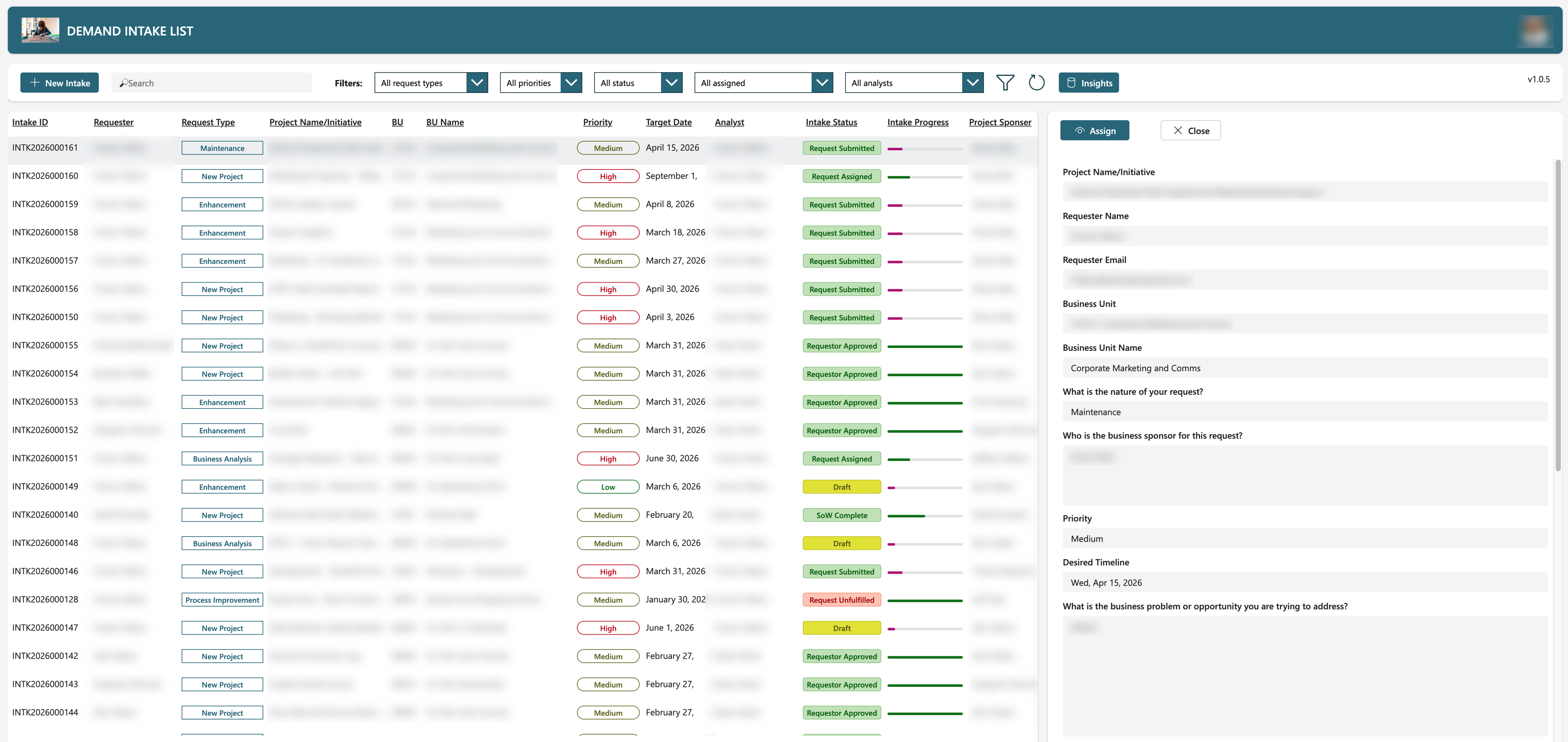
Intake List
Requestor View
Technologies Used
 Power Apps (Canvas App): The primary user interface, built as a canvas app and accessed by the entire organisation. Requestors managed their intakes and tracked status through submission to final approval; PMO users had access to the full intake list with assignment controls.
 Power Automate: All data operations and notifications were handled through Power Automate flows, covering intake creation, status updates, and email dispatch at each workflow transition.
 SharePoint List: The data store for all demand intakes, holding every record and its associated metadata — status, assignees, estimates, costs, and document attachments — within the organisation's existing Microsoft 365 footprint.
 Azure DevOps: Provided the CI/CD pipeline for solution promotion, exporting the unmanaged solution from Dev, converting it to a managed package, and deploying through UAT to Prod in a version-controlled, repeatable process.
 Power BI: A reporting dashboard connected directly to the SharePoint list, giving the PMO self-service analytics across the demand portfolio without manual tracking or ad-hoc queries.
 Microsoft Exchange (Outlook): Email notifications dispatched through Outlook via Power Automate at each workflow transition, targeted to the role responsible for the next action.